


Unreal Engine


Solo
8 weeks
Procedural Level Population Tool

About
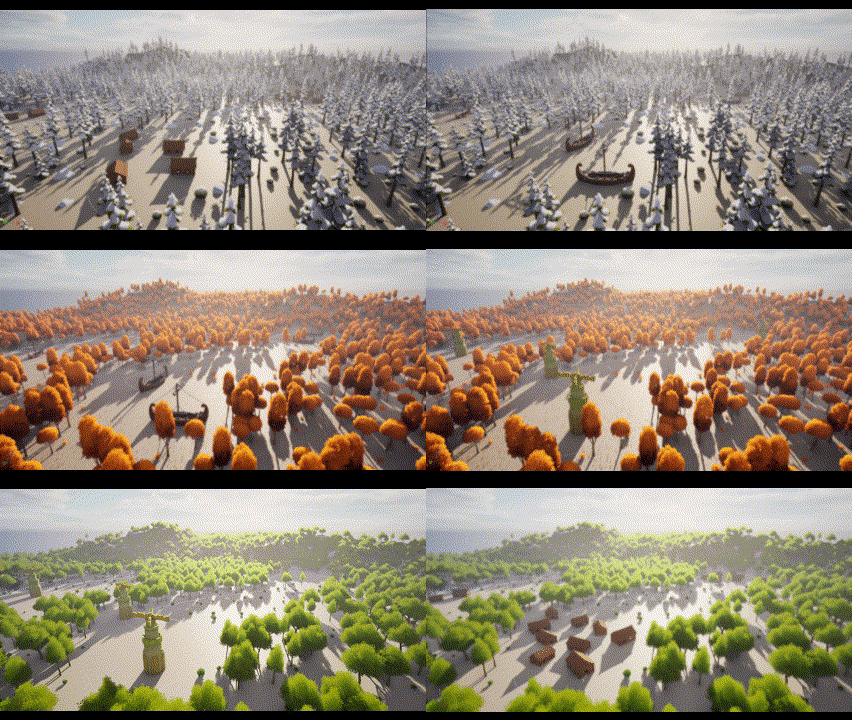
A project tool that allows developers to quickly populate a level with procedural content in two categories, landmarks & biomes.
The project consists of two PCG graphs, which can be placed together into a level landscape. Their generated content can be edited and saved to create new variations of the produced content. An editor utility widget allows designers to switch between the created instances.


Key Responsibilities:


This meant tailoring to the developer's experience so that the tool could be used in a reliable and modular fashion. Together with the player experience that could be created with this tool, a lot of focus was put into features remaining modular to give the biggest freedom of expression with the procedural landscape.

Tool Development
To aid the ease of functionality, and to allow developers to modify code, I made sure to make the structure of the project as modular as possible.
For quick access, I kept assets organized in a hierarchical folder structure that would be intuitive for a developer. I added comments to blueprints to communicate the functionality of the nodes present, and added descriptions to variable to let developers know what they were changing and how this would impact the outcome.
The User
While developing a tool system within Unreal, it was important to keep the user experience at the front and center of the project. The project aimed to allow Level Designers to quickly populate a scene with a larger Biome area and include any point of interest within their level design.
The development of a Museum was completed to allow for the user to have quick access to information regarding the tool and it's components.
Within the Museum, I showcased the main elements of the tool, providing functionality descriptions and providing instructions on how to modify the generated content.
The Museum is interactive and aims to serve as an introductory explanation for anyone using the tool. At a quick glance, a developer is able to become familiar with the components they are using, and quickly set up procedural generation in their own levels.
Museum


Tool Structure


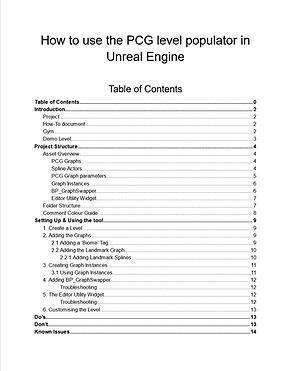
How-To Document
In order to give clear communication on how to implement the tool into a new project, I created a How -To document that leads developers through the process of setting up and using the tool.
Within the document, there is a full break down of all assets and what they constitute to the project. For example, what a PCG Graph is in Unreal Engine, how they are utilized in my project and how can they be edited to fit the needs of a developer.
The document also includes a list of Do's and Don'ts so that developers have a quick overview of the limitations of the tool, as well as a list of known issues so that any problems can be quickly addressed.

Engine Research
While developing the tool, I found it important to get familiar with the way that procedural generation worked within Unreal Engine. This lead to a lot of experimentation in Engine to get the desired result of two procedural graphs that were able to interact with each other, but still remain modular and scalable for designers to create unique level instances. These are some of my solutions:


Experiments

In order to create the tool, I needed to investigate the PCG plug-in present in Unreal Engine 5.4. This meant learning the limits and bounds of the system in Unreal, and finding out what solutions worked and what pathways did not. I started with simple population of a plane, and gradually looked at different tools, such as Scattering Points, Parameters and Subgraphs, some of them yielding my desired results. The experiments that failed still allowed me to see the limit of the tool that I was creating and allowed me to get more familiar with the overall PCG System.


PCG Graphs


Within Unreal engine, PCG Graphs provide an optimal and simple way of creating points that can spawn meshes or actors to populate a scene. I utilised graph blueprint with specific nodes such as modifying the spawned points with the 'Bounds Modifier' node, so that I can alter the points that are generated, and create a fluid system that has optimal control for those populating the scene.
Instances & Parameters

Saving instances of a PCG Graph allowed me to create variations of biomes and landmarks for a user to switch between them, and create my tool using this principle. Through the use of parameters, I was able to allow developers to easily edit the instance they are trying to create, such as the scale meshes, adding new meshes, and tweaking the density of the generated biomes and landmarks. This allowed the tool to be modular and customizable.


Splines

The last step to creating a more modular tool was integrating splines to allow developers to spawn landmarks or other features into the level. I created a custom spline actor that could generate the landmarks that I wanted present in the graph. Therefore, I could get the spline data and cut out the shape of the spline from the biome that was generated, creating a seamless integration, and a highly customizable tool to create these landmark instances.

In order to create a tool that utilized procedural content, I researched relevant emerging technologies surrounding Procedural generation,
The research question I posed was "How can Procedural Content Generation enhance a player experience?" This question allowed me to understand the different use cases that come with procedural generation, and which aspects of the tool would therefore be most useful for designers. In order to investigate this fully, I broke down this question into three sub questions:
-
“What techniques are currently being used to generate procedural content within games?”
-
“How do these methods impact the Level Design?”
-
-
“What type of limitations does Procedural Content Generation create for players and for developers?”
The procedural generation methods that I discussed within the paper were Search Based Approaches, Noise & Fractal Approaches, and Constructive Approaches.


Researching Procedural Generation
Research Takeaways & Conclusions
Through this research, I was able to establish that the tool that I should build should remain easily accessible and modular so that it can serve to aid creativity and be tailored to the needs of a level designer.
The best results are yielded in conjunction with the aid of PCG, but not with a solely PCG based approach. This means that the project must leave room for design and creativity to flourish and be implemented in an adjustable fashion to allow for designed spaces to exist.
Additionally, I concluded that Procedural Generation is best used as a tool to guide the creative flow of developers rather than a standalone solution to the problems faced in level design.

Sketch Breakdown of an Evolutionary Algorithm

Project Takeaways
Creating a tool requires a strong focus on modularity and clarity. This was challenging throughout the project as I had to consistently think about both the tool functionality and the scalability of what I was creating. As this was a fairly new exploration towards Procedural Generation in Unreal, there was a lot of learning involved towards the systems that allowed me to fully customise the experience.
Something that I loved from this project was how much I learned about our evolving technology regarding all the different methods that you can procedurally generate content. I had no idea that there were so many different methods, with varying complexity, that we were developing as tools for designers to use within the industry! Researching this topic allowed me to gain insight into emerging technologies, and using this allowed me to customise and build my tool in a more conscious method.
It was especially challenging approaching new and unknown technology like procedural generation, and it was especially intimidating at the start, but once I had been able to get comfortable with these new systems in engine, I learned to enjoy the process and explore all the potential it had to offer!
